




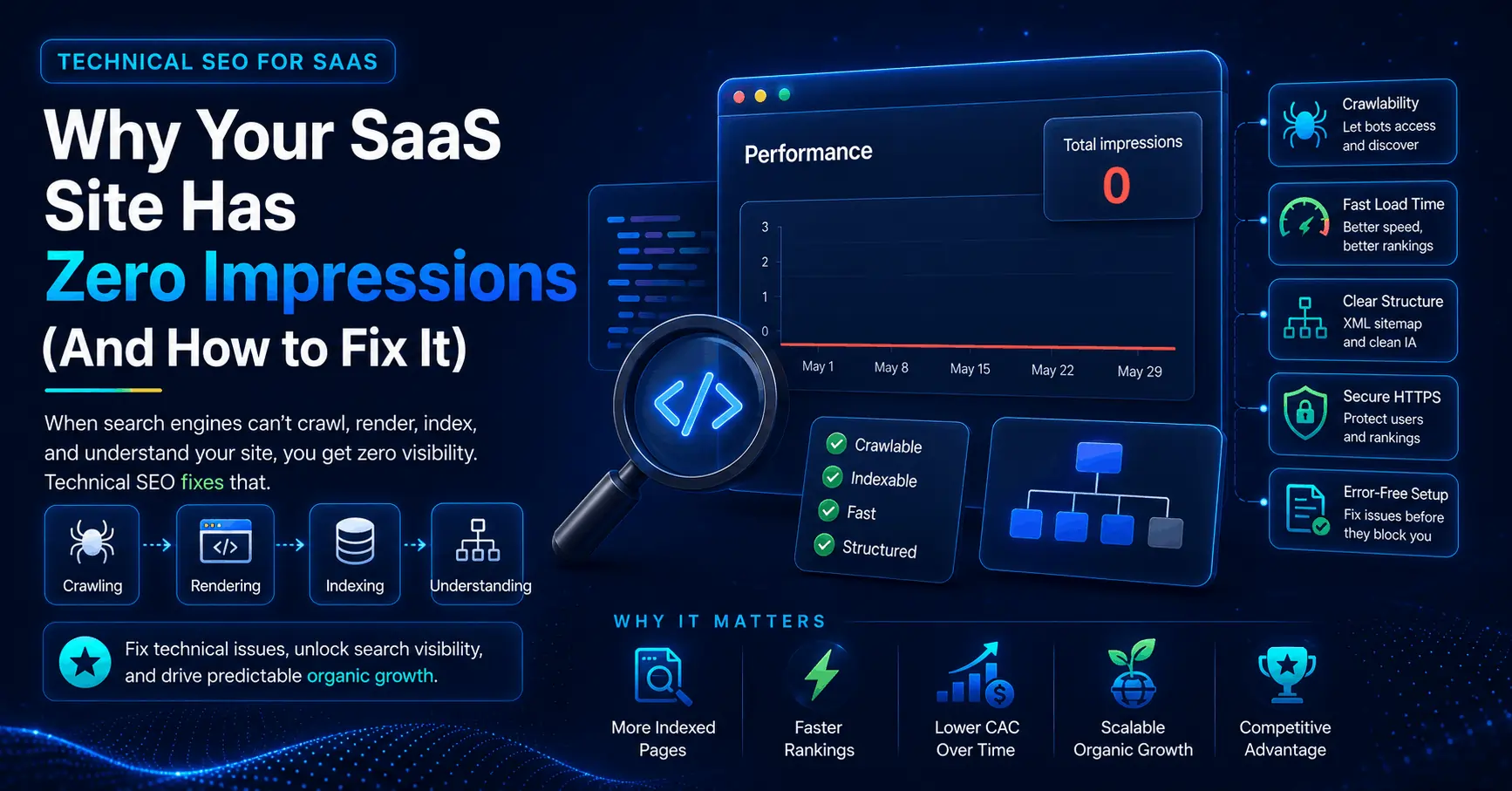
You publish a sharp comparison page. Three weeks later it has zero impressions in Search Console. The writing is solid and the keyword research was careful, so what went wrong?
For most software companies, the answer sits underneath the content. Technical SEO for SaaS is the layer that decides whether search engines can crawl, render, and index your pages at all, long before keywords or backlinks enter the picture. When that layer fails, your best work stays invisible.
Here is the part most founders miss: SaaS sites break in search for reasons a local bakery’s website never will. They run on JavaScript frameworks, they sprawl into hundreds of overlapping pages, and they ship new code every week. Each trait creates a specific failure mode that quietly caps your organic growth.
This guide skips the generic checklist. It covers what makes SaaS technical SEO different, why it matters more for startups than for almost any other business, and the exact fixes worth your time, in the order that delivers the most return.
What is Technical SEO for SaaS?
Content SEO is about what you say: keywords, topics, search intent, the words on the page. Technical SEO is about whether a search engine can reach those words, load them fast, and understand how they fit together. The two work as a pair, but order matters. If a crawler cannot see your pricing page, no amount of clever copy will rank it.
For a software company, technical SEO comes down to four jobs:
- Crawling. Search bots can find and access your pages.
- Rendering. Bots see the same content a human sees, even when the page is built with JavaScript.
- Indexing. Those pages actually get stored in the search index.
- Understanding. Your structure, internal links, and schema tell search engines what each page is for.
Skip any one and the rest stops mattering. There is also a SaaS-specific wrinkle worth stating up front: your product is not your website. The application lives behind a login and runs as an interactive app for paying users. Search engines never see it, and they should not. All of your organic leverage sits on the public marketing surface: homepage, feature pages, blog, comparison pages, and docs.
Why SaaS sites break in search (what generic guides skip)
A five-page plumber’s website almost never has a technical SEO problem worth fixing. A SaaS startup almost always does. Three structural traits explain why.
Your marketing site is probably a JavaScript app
Most modern SaaS sites run on React, Next.js, Vue, or a similar framework, and many rely on client-side rendering, where the browser assembles the page after it loads. The problem: a crawler can arrive, request the page, and receive a nearly empty HTML shell with the real content stuck behind JavaScript it has not executed yet.
Google can render JavaScript, but it does so on a delay and not always reliably. Many AI crawlers do not execute JavaScript at all. So content that looks perfect to a human visitor can be invisible to the systems deciding your rankings. This is the single highest-leverage technical decision a SaaS team makes, and the one most likely to be silently wrong.
SaaS sites sprawl into hundreds of pages
Software products generate pages fast: feature pages, integration pages, documentation, changelogs, help articles, use-case landing pages, comparison pages, pricing tiers, and localized versions. Without deliberate structure, those pages start competing for the same search terms, a problem called keyword cannibalization.
They also create duplicate signals that leave Google unsure which page deserves to rank. Documentation is a frequent offender. A large, unstructured docs section can become a crawl sink that absorbs attention and outranks the product pages you want surfaced. If your help docs rank above your feature pages, that is a structure problem, not a quirk.
You ship code every week
SaaS engineering teams deploy constantly, and deploys break SEO in quiet ways. A noindex tag meant for staging gets promoted to production. A robots.txt edit blocks an entire directory. A URL gets renamed without a redirect. A redirect chain grows three hops long.
None of this announces itself. You usually discover it months later, when a page you forgot about has dropped out of the index. Fast shipping is a strength for product velocity and a liability for search visibility unless someone is watching.
Why is technical SEO important for SaaS startups?
The importance of technical SEO for SaaS startups comes down to economics. Paid acquisition gets more expensive almost every quarter. Organic search is the rare channel where cost per acquisition tends to fall over time, because content and authority compound while ad spend resets to zero the moment you stop paying.
That compounding only works if the foundation holds. A few reasons it matters more for SaaS than for a local business or a media site:
- Your funnel starts on the marketing site. Sign-ups begin with a page someone found in search. If that page is slow or unindexed, the funnel leaks at the very top.
- You publish constantly. Crawl efficiency decides how fast new features, integrations, and articles get discovered and ranked.
- You compete in crowded categories. Most SaaS keywords are contested by well-funded rivals. Technical hygiene is one of the few edges you fully control.
- One fix lifts every page. Repairing crawlability or rendering improves the whole site at once, not a single URL.
The benefits of technical SEO for SaaS startups stack up from there: faster indexing of new pages, lower acquisition cost as organic grows, better conversion from faster load times, and the headroom to scale content without drowning in low-value URLs. The short version is leverage. Get the foundation right once and everything you build on top of it performs better.
Technical SEO for SaaS Companies Best Practices
You cannot fix everything at once, and you should not try. These are the technical SEO for SaaS companies best practices worth your limited time, ordered roughly by impact for an early-to-growth-stage startup.
1. Make your content renderable
Nothing else matters if your content is not in the index. Confirm what crawlers see using the URL Inspection tool in Google Search Console, which shows the rendered HTML and a screenshot for any page. If your headline, body copy, and links are missing, you have a rendering problem.
A faster gut check: open a key page, view the page source (the raw HTML, not the rendered DOM in your browser’s dev tools), and search for a sentence you can see on screen. If it is missing from the source, that content depends on JavaScript to appear.
The fix is to serve real HTML before it reaches the crawler. For marketing pages, that means server-side rendering (SSR) or static site generation (SSG), both well supported by frameworks like Next.js, Nuxt, and Astro. Reserve client-side rendering for the logged-in app, where SEO does not apply.
2. Get crawlability and indexation under control
Search engines give your site a finite amount of crawl attention. SaaS sites waste it in predictable ways: parameter URLs from filters and tracking tags, paginated archives, faceted navigation, thin tag pages, and near-identical programmatic pages. The result is index bloat, where thousands of low-value URLs compete for crawl budget and drag down how Google perceives the site.
Audit what Google has indexed in the Pages report in Search Console, then prune with the right tool for each case:
- robots.txt to block crawling of paths with no search value.
- noindex for pages that must exist but should not rank, such as thank-you pages and internal search results.
- canonical tags to consolidate duplicates onto one preferred URL.
- An XML sitemap that lists only your canonical, indexable pages, kept current automatically.
Crawl budget matters most once you pass a few thousand URLs, so larger and faster-growing sites should watch it closely. Smaller sites should still keep junk out of the index, but they rarely hit a hard ceiling.
3. Fix Core Web Vitals and page speed
Page experience is both a ranking input and a conversion lever. Google measures three real-world metrics:
- Largest Contentful Paint (LCP): how fast the main content loads. Aim for under 2.5 seconds.
- Interaction to Next Paint (INP): how responsive the page feels to clicks and taps. INP replaced First Input Delay in 2024, so update any older checklist. Aim for under 200 milliseconds.
- Cumulative Layout Shift (CLS): how much the layout jumps around as it loads. Aim for under 0.1.
SaaS marketing sites tend to be heavy. Large hero videos, stacked analytics and chat scripts, custom fonts, and framework JavaScript all add weight. Practical wins: compress and lazy-load images, serve assets from a CDN, trim the third-party scripts you do not truly need, self-host fonts, and reserve space for elements so the page does not shift as it loads. One caveat: field data updates on a rolling average, so a fix you ship today takes a few weeks to show up fully.
4. Structure the site around buyer intent
A clean architecture helps crawlers and users reach your most important pages. Two principles handle most of it.
Keep it flat. Any page that matters should be reachable within about three clicks of the homepage. The deeper a page is buried, the less often it gets crawled and the weaker its ranking signals.
Group content by what the buyer is trying to do, not by how your teams are organized. A prospect comparing tools does not care about your internal split between “platform” and “product.” The most reliable pattern is hub-and-spoke: a pillar page on a broad topic links out to supporting articles, and they link back.
Then point your internal links deliberately at the commercial pages you want to rank. Internal links pass authority and help Google discover pages, yet SaaS sites routinely publish new posts as orphans with nothing pointing to them. Build a simple habit: every time you publish, add two or three internal links from relevant existing pages to the new one.
5. Kill duplicate content and cannibalization
SaaS sites generate duplicates without trying. Trailing-slash variants, HTTP and HTTPS, www and non-www, parameter URLs, and print versions all create copies, and every copy splits ranking signals.
Pick one canonical version of each URL and enforce it with redirects and self-referencing canonical tags. Where two pages target the same intent, consolidate the weaker one into the stronger, or set a canonical to nominate the primary version. The goal is one strong page per search intent, not five mediocre ones splitting the signal.
One more thing to check: a surprising number of canonical tags quietly point to a staging domain or to the homepage by mistake. While you are at it, protect any staging environment with password authentication, since a dev site that gets indexed leaves Google holding a full duplicate of your site.
6. Add structured data
Schema markup tells search engines what a page is in machine-readable terms, and it can earn richer results. For SaaS, a few types pull their weight:
- SoftwareApplication on product and pricing pages, including category and pricing.
- FAQPage on pages with real question-and-answer content.
- BreadcrumbList to clarify site structure in the results.
- Organization for brand and logo signals.
Add schema as valid JSON-LD, test it in Google’s Rich Results Test, and only mark up content that appears on the page. Inventing reviews or marking up invisible content invites a manual penalty. Structured data also does double duty for AI search, which is the next section.
7. Scale programmatic pages on a clean foundation
Programmatic SEO, generating large sets of pages from a template and a data source, is one of the highest-leverage plays in SaaS. Think integration pages (Tool A plus Tool B), use-case pages, and comparison pages.
But scale amplifies whatever foundation you start with. If your template renders client-side, you have just created thousands of pages Google cannot read. If the pages are thin or near-identical, you have built a doorway-page problem that can trigger a quality demotion. Before generating pages at scale, server-render the template, give each page unique and useful content, set clean canonicals, and add the set to your sitemap in batches so you can watch indexing keep pace. Quality threshold first, volume second.
The 2026 layer: technical SEO for AI search
Here is the part most technical SEO guides still skip. Search no longer means Google’s ten blue links alone. A growing share of buyers now ask AI Overviews, ChatGPT Search, Perplexity, or Claude, and they often act on a synthesized answer without clicking through to anyone.
These systems crawl and weigh content differently. They lean on clean structured data, clear semantic headings, concise answer-first summaries, and fresh content, and several are far less forgiving of JavaScript than Google is. Three practical moves:
- Decide your robots.txt posture on purpose. AI crawlers like GPTBot, OAI-SearchBot, PerplexityBot, and ClaudeBot can be allowed or blocked. (AI Overviews draw from Google’s standard index, so Googlebot already covers that path.) Many sites block these by accident or outdated default. Choose deliberately, because the default decides whether AI tools can cite you at all.
- Write for extraction. Lead a section with a tight summary that answers the implied question, then expand. AI systems pull the cleanest available answer, so make yours the cleanest.
- Render server-side. Worth repeating, because it matters even more here. If your content depends on client-side JavaScript, AI crawlers will frequently miss it.
People call this answer engine optimization or generative engine optimization. The label matters less than the point: the same foundation that makes you crawlable and understandable to Google is what gets you cited by AI. Build it once, and it reinforces both. Most SaaS teams are not thinking about this yet, which is exactly why doing it now is an edge.
How to prioritize when you have no time
A word of caution before you open ten browser tabs of audit tools. Not every technical issue is worth fixing, and the loudest ones are often not the most valuable.
Prioritize by business impact, not by an audit tool’s severity score. Roughly a fifth of your pages drive most of your results, so protect those first. The order that works for most SaaS startups:
- Can search engines and AI crawlers see and index your money pages (pricing, top features, comparisons)? Fix this before anything else.
- Are your highest-intent pages indexed and free of cannibalization?
- Is rendering solid across the marketing site?
- Are Core Web Vitals reasonable on the pages that convert?
- Is structured data in place where it earns richer results?
If an issue does not touch revenue or the pages near it, it can wait.
Your first technical SEO audit
Starting from zero? You can find the biggest problems in an afternoon:
- Open Google Search Console and read the Pages report. Note what is indexed and what is excluded, and why.
- Run URL Inspection on your three most important commercial pages and check the rendered HTML for missing content.
- Crawl the site with a tool like Screaming Frog (free up to 500 URLs) to surface broken links, redirect chains, and stray noindex tags.
- Check robots.txt for accidental blocks, and decide your stance on AI crawlers.
- Confirm your XML sitemap is current and submitted.
- Test Core Web Vitals on your top converting pages with PageSpeed Insights.
- Add or verify schema on product, pricing, and FAQ pages.
Then make it routine. Technical SEO is maintenance, not a one-time project, because sites drift as teams ship.
The takeaway
Technical SEO for SaaS is not the flashiest part of growth, but it is frequently the fastest way to improve rankings without writing a single new word, because it lets the content you already have finally perform. The traits that make SaaS sites powerful (JavaScript frameworks, fast shipping, and deep page libraries) are the same ones that break them in search when left unmanaged.
Start at the bottom of the stack, where everything else depends. Open Google Search Console and run URL Inspection on your top three revenue pages right now. If the rendered content looks thin or a page is missing from the index, you have found the thing holding back your organic growth, and you can fix it before you write another word of content.
Frequently Asked Questions About SaaS Technical SEO
What is SaaS-based SEO?
SaaS-based SEO is the process of optimizing a software company’s website to attract qualified prospects, free-trial users, demo requests, and paying customers from organic search. Unlike traditional SEO, SaaS SEO is not just about increasing traffic or ranking for high-volume keywords. The real goal is to bring in searchers who are actively looking for a solution your software provides.
A strong SaaS SEO strategy focuses on buyer intent, product-led content, technical performance, comparison pages, feature pages, use-case pages, and educational blog content. The best measure of success is not vanity metrics like clicks or impressions alone, but how many search visitors turn into sales qualified leads, sign-ups, trials, and customers.
Is SaaS being replaced by AI?
No, AI is not replacing SaaS. Instead, AI is changing how SaaS products work, how users discover them, and how companies market them. Traditional SaaS tools are evolving from fixed software platforms into smarter, more automated systems that use AI to personalize workflows, answer questions, analyze data, and complete tasks faster.
For SaaS companies, this means SEO also needs to evolve. Buyers are no longer only searching on Google; they are also asking AI tools, answer engines, and chat-based search platforms for recommendations. SaaS brands that publish clear, helpful, well-structured content are more likely to be discovered, cited, and trusted in both traditional search and AI-powered search results.
How do you do SEO for SaaS?
To do SEO for SaaS, start by understanding your ideal customers, their pain points, and the search terms they use at each stage of the buying journey. Build pages around high-intent keywords such as product features, use cases, integrations, alternatives, comparisons, pricing, and industry-specific problems.
Next, create useful content that helps prospects evaluate solutions, not just learn general information. This includes blog posts, product-led guides, comparison pages, templates, case studies, and FAQ sections. Make sure every important page is technically sound: crawlable, indexable, fast-loading, mobile-friendly, internally linked, and supported with schema markup.
The most effective SaaS SEO strategy combines three things: content that matches buyer intent, technical SEO that helps search engines understand your site, and conversion-focused pages that turn visitors into trials, demos, or paying users. In SaaS, SEO success is measured by pipeline and revenue, not traffic alone.
Last Updated on 1 month ago by Alipio Umiten IV
