




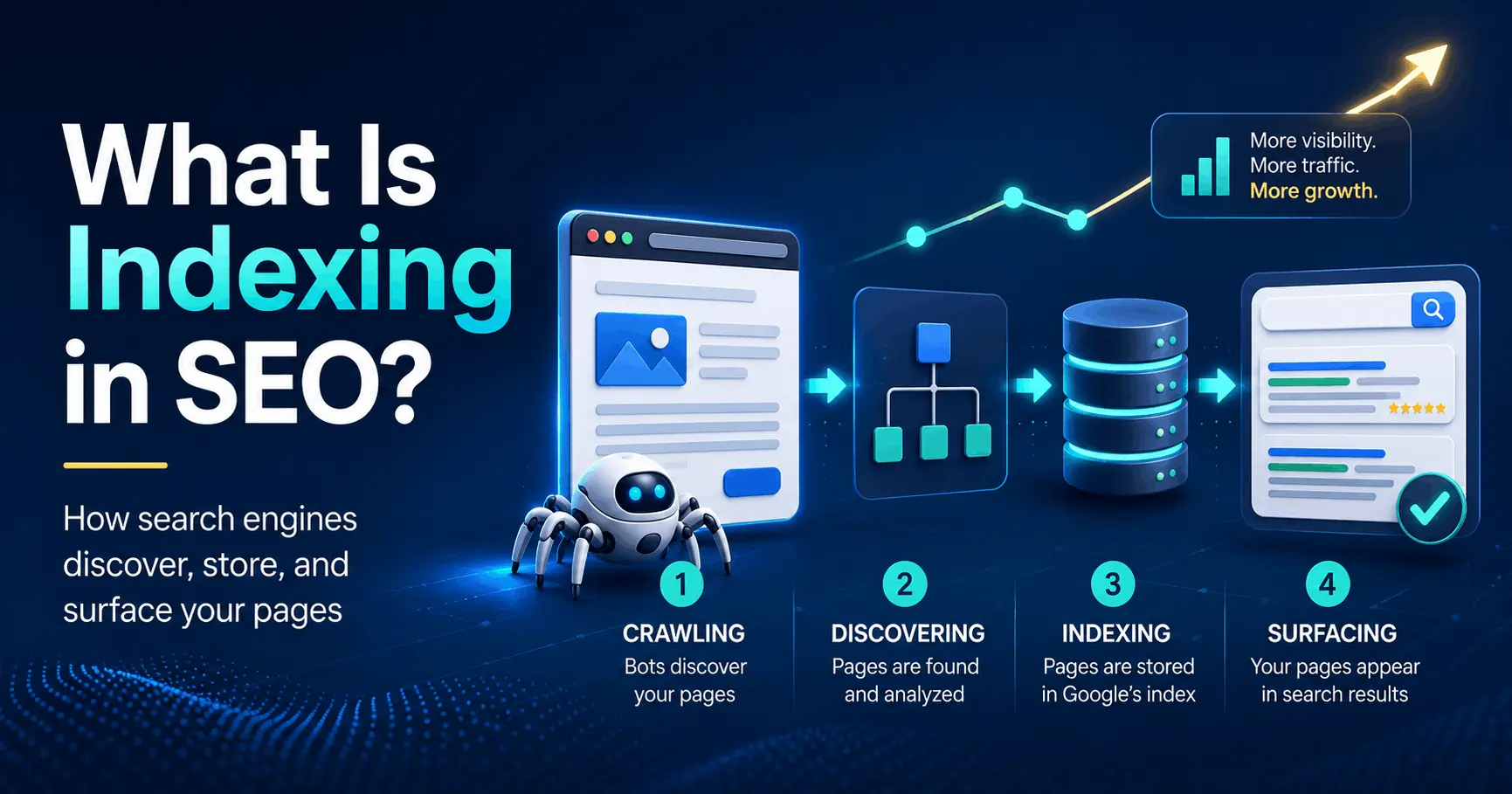
SEO indexing puts your page into Google’s searchable database. Without it, your page cannot rank, earn clicks, or bring in organic traffic, no matter how strong the writing is.
You publish the page. The keyword fits. The content reads well. It looks polished on screen. Then, three weeks later, you search Google and find nothing.
Most of the time, indexing caused the problem. Google has not added your page to its index, so the page does not exist in search results. No index, no rankings. No rankings, no traffic.
That used to be less of a problem because Google indexed most decent pages almost automatically. Not anymore. Google now decides whether your page deserves a place in its database, and more pages quietly miss the cut.
This guide explains what SEO indexing means, how it differs from crawling and ranking, how to check whether Google indexed your pages, and what to fix when it did not. By the end, you’ll be able to diagnose a missing page in Google Search Console in about five minutes.
What Is Indexing in SEO?
Google’s index is a database, and a staggeringly large one, holding hundreds of billions of web pages.
When you type a query into Google, you are not searching the live web. You are searching Google’s stored copy of it. Google crawled those pages earlier, processed them, and filed the useful ones away. Your search just pulls matches from that filed-away collection.
This is the distinction people miss. Being live on the web and being in Google’s index are two separate things. Your page can be online, loading perfectly, and completely absent from the index. If it is absent, it cannot appear in results, full stop.
So a cleaner definition: indexing is the act of analyzing a page, deciding it is worth storing, and filing it in the database so it can be retrieved for relevant searches. Getting indexed makes a page eligible to show up. It does not make it guaranteed to show up. That is a separate fight called ranking.
Crawling vs. indexing vs. ranking
These three words get tossed around as if they mean the same thing. They don’t, and the difference matters the second you start troubleshooting.
Picture three gates a page passes through, in order:
Crawling is discovery. Googlebot, Google’s automated crawler, finds a URL and downloads its content.
Indexing is processing and storage. Google analyzes what it crawled, makes sense of it, and decides whether to file it in the index.
Ranking is ordering. When someone searches, Google pulls relevant pages from the index and sorts them into the results you see.
Each gate is separate, and a page can clear one but fail the next. A page can be crawled and never indexed. A page can be indexed and never crack the first page. Knowing which gate your page is stuck at tells you exactly what to fix. Chasing rankings for a page that was never indexed is wasted effort on a race it never entered.
How Google indexing works, step by step
Indexing is not one action. It is a short pipeline, and a page can drop out at any stage.
Discovery. Google learns a URL exists, usually from a link on a page it already knows or from your XML sitemap. There is no master list of the web, so discovery never really stops.
Crawling. Googlebot requests the page and downloads the raw HTML. If your robots.txt file blocks the URL, Googlebot stops right here and never sees the content.
Rendering. Google then runs the page the way a browser would, JavaScript included, so it sees what a real visitor sees. For sites built on frameworks like React or Vue, this rendering can lag behind the first crawl by hours or even weeks. That is why content sitting in plain HTML gets indexed faster and more reliably than content that only appears after scripts run.
Mobile-first indexing. Google primarily uses the mobile version of your page to index and rank it. This is the default now, not a special case. If your mobile layout hides something your desktop layout shows, that hidden content is effectively invisible to the index.
Canonicalization. When several URLs hold near-identical content, Google groups them and picks one canonical version to store, then drops the rest from results. A classic example: a product reachable at ?color=blue, ?color=red, and a clean base URL. Google keeps one and quietly merges the others.
Storage. If the page survives all of that, Google adds it to the index, where it becomes eligible to appear in search.
That last step is a decision, not a formality. Google crawls far more than it keeps, and it increasingly passes on pages it judges to be low value.
How to check if your page is indexed
Before you fix anything, confirm the problem. Three methods, quickest first.
- The site: search. Type site:yourdomain.com/your-page-url into Google. If the page shows up, it is indexed. If you get nothing, it probably isn’t. This is fast, but treat it as a rough signal rather than proof.
- The URL Inspection tool. In Google Search Console, paste any URL from your verified site into the inspection bar at the top. Google tells you plainly whether the page is on Google, when it was last crawled, which version it chose as canonical, and any problems it found. This is the source of truth for a single page. If you set up only one tool for your site, make it Search Console.
- The Page Indexing report. Also in Search Console, this report (the one that replaced the old Coverage report) covers your whole site and groups unindexed pages by reason. This is where you spot patterns, like 400 product pages all stuck under one status, that point to a single root cause worth fixing once instead of 400 times.
Why your pages aren’t getting indexed
This is the part most people came for. When a page won’t index, Search Console usually labels the reason. Here are the ones you’ll actually run into and what each one means.
Crawled, currently not indexed. Google fetched the page and chose not to store it. This is the big one, and it is almost always a value judgment, not an error. The page is too thin, too similar to others, or adds nothing the index doesn’t already have. There is no broken setting to flip. You have to make the page genuinely better.
Discovered, currently not indexed. Google knows the URL exists but hasn’t crawled it yet, often because it doesn’t see enough reason to prioritize it. You see this most on large sites that spin up piles of low-value URLs.
Excluded by ‘noindex’ tag. Your page is explicitly telling Google to stay out, usually via a robots meta tag or X-Robots-Tag header. Sometimes that is intentional. Often it is a leftover from a staging site or something a plugin added by accident. Check this first when a page you clearly want indexed refuses to appear.
Blocked by robots.txt. Your robots.txt file is stopping Googlebot from crawling the URL at all, so Google can’t read the content.
Duplicate, Google chose a different canonical. Google sees your page as a near-copy of another and indexed that one instead. The URL Inspection tool will show you which URL it picked.
Soft 404. The page returns a success status but looks empty or error-like to Google, so it gets treated as a dead end.
Thin or low-value content. Auto-generated pages, near-empty category pages, and location pages with only the city name swapped out get filtered routinely.
Orphan pages. No internal links point to the page, so Google struggles to find it and reads the silence as a sign the page doesn’t matter.
The two “currently not indexed” statuses confuse people the most, because nothing looks broken. The page loads. The code is clean. Google simply decided it wasn’t worth keeping. That is a signal about your content, not your plumbing, and no amount of resubmitting will change Google’s mind. A better page will.
noindex vs. robots.txt: the difference that trips everyone up
These two get mixed up constantly, and the mix-up backfires.
A noindex tag blocks indexing. It lets Google crawl the page, read the instruction, and obey it by keeping the page out of results.
A robots.txt rule blocks crawling. It stops Googlebot from fetching the page in the first place.
Here is the trap. If you want a page out of the index and you block it in robots.txt, Google may never crawl it, which means it never sees your noindex tag. Worse, Google can still index a blocked URL it discovers through links, showing it in results with no description at all. So to truly keep a page out of the index, leave it crawlable and use noindex. Never combine the two for that job.
A quick word on crawl budget
You’ll see “crawl budget” thrown around in indexing discussions, so here is the honest version.
Crawl budget is roughly how many pages Google is willing to crawl on your site in a given window. For most sites, it is a non-issue. If you run a blog or a small business site with a few hundred pages, Google can comfortably crawl all of it, and crawl budget is not why your page is missing.
It starts to matter on large sites: tens or hundreds of thousands of URLs, faceted navigation spinning up endless filter combinations, or slow servers that make crawling expensive. There, Google burns its limited crawling on the wrong URLs and your good pages wait. The fix is structural. Trim low-value URLs, speed up the server, and steer Googlebot toward what matters with clean internal links and a tidy sitemap. Small site? Skip the worry and focus on content and links.
How to get your pages indexed
Once you know why a page is stuck, here is the playbook. Work through it in order, because some steps are pointless until the earlier ones are sorted.
- Confirm the page is actually indexable. Check for a stray noindex tag and make sure robots.txt isn’t blocking the URL. These are quick wins and a shockingly common cause. Nothing else matters while the door is locked.
- Make the page worth indexing. This is the real fix for “Crawled, currently not indexed.” Give it genuine depth, a clear purpose, original information, and a tight match to what searchers actually want. Merge or cut thin pages rather than waiting for them to index. A page that earns its slot gets kept.
- Strengthen internal linking. Link to the page from other relevant, already-indexed pages on your site. Those links give Googlebot a path to it and signal that the page matters. Use descriptive anchor text like “technical SEO checklist,” not “click here.”
- Submit an XML sitemap. List your important URLs in a sitemap and submit it in Search Console. It won’t force indexing, but it helps Google discover pages and understand which ones you consider important.
- Request indexing. In the URL Inspection tool, click Request Indexing to push a single new or updated page into Google’s crawl queue. It is built for one-off pages, not bulk use, and requests are rate-limited, so don’t waste them on minor copy edits or on pages you already know are too thin.
- Earn an external link. A single relevant link from another indexed site gives Google another route to your page and a small vote of confidence, which helps newer pages especially.
- Then give it time. Indexing is not instant even when everything is right. Recheck the status in Search Console after a few days instead of firing off the same request again and again.
Does being indexed mean you’ll rank?
No, and it is worth being blunt about this so you set the right expectations.
Indexing is the entry ticket, not a finishing position. Once your page is in the index, it competes against every other indexed page for the same query. Relevance, content quality, page experience, and links decide where it lands. Plenty of indexed pages sit on page five forever. Getting indexed means you are eligible to rank. The rest is the actual race.
Indexing in 2026: aim for index-worthy, not just indexed
The mechanics above are stable, but the stakes around indexing have shifted, and ignoring that will date your SEO fast.
First, Google has gotten pickier. Because AI tools made it trivial to crank out endless content, Google raised the bar for what it bothers to keep, and reports through 2026 point to it quietly deindexing thin and duplicative pages across many sites. Mass-producing low-value pages no longer works the way it once did.
Second, your indexed content now feeds more than the classic blue links. AI Overviews and other AI-generated answers pull from pages Google has already indexed and trusts. If you are not in the index, you are invisible to those surfaces too.
The takeaway is simple. The goal was never to get every page indexed. The goal is to publish pages good enough that Google wants to keep them and surface them. Index-worthy beats indexed.
How long does indexing take?
There is no fixed timeline. New pages on an established site that Google crawls often can be indexed within hours or a couple of days. New pages on a brand-new site can take weeks, and some never get indexed at all if they don’t clear the value bar.
Three things speed it up: a healthy site Google already crawls frequently, strong internal and external links pointing at the page, and content that is clearly worth storing. If a page still isn’t indexed after a few weeks and you have ruled out technical blocks, treat it as a quality signal, not a glitch, and improve the page itself.
The bottom line
Indexing in SEO is the step that decides whether your page exists in Google’s eyes. Crawling finds it, indexing stores it, and ranking positions it. Skip indexing and nothing downstream can happen, which is why it is the first thing to check whenever a page underperforms.
So start there. Open Google Search Console, run the Page Indexing report, and find your most important page that isn’t indexed. Match its status to the fixes above, clear the blocker or improve the content, and request indexing. Do that this week, and you’ll have turned an invisible page into one that finally has a shot.
Frequently Asked Questions About SEO Indexing
Here are quick answers to the most common questions about SEO indexing, crawling, and how pages appear in Google Search.
What does SEO indexing mean?
SEO indexing means search engines analyze your web page and store it in their searchable database. Once Google indexes your page, it can appear in search results. If Google does not index your page, the page cannot rank, even if it is live on your website.
What is indexing in SEO in simple words?
In simple words, indexing means Google saves your page in its search database. Think of it like adding a book to a library. When Google indexes your page, it can show the page for relevant searches. If Google does not index it, people will not find it through Google Search.
What is crawling and indexing in SEO?
Crawling and indexing are two different steps in how search engines process websites. During crawling, search engine bots such as Googlebot discover and visit a page. During indexing, Google analyzes the page and decides whether to store it in its search index.
What happens first, crawling or indexing?
Crawling happens first. Search engines must discover and fetch a page before they can analyze and index it. Google can crawl a page without indexing it, but it cannot index a page without first discovering and crawling it.
What happens if a website is not indexed?
If Google does not index a website or page, it will not appear in organic search results. People can still visit it directly through a URL or a shared link, but they will not find it by searching on Google. This can seriously limit your website’s visibility, rankings, and organic traffic.
Does indexing mean a page will rank?
No. Indexing only makes a page eligible to appear in search results. After Google indexes a page, it still needs to rank the page based on relevance, quality, authority, and other ranking factors. A page must be indexed before it can rank, but indexing does not guarantee high rankings.