





Your site has pages that should rank and don’t. Traffic is leaking somewhere, and your analytics dashboard won’t tell you where.
An SEO audit is how you find the leak. So what is an SEO audit, and how do you do one without hiring an agency or buying expensive software? It’s a structured review of everything affecting your search performance, run so you can stop guessing and fix what actually costs you traffic.
This guide gives you a repeatable process you can run yourself in an afternoon, using mostly free tools. You’ll learn what to check, what order to check it in, and the part most beginners skip: how to decide which problems to fix first.
No SEO background needed.
What Is an SEO Audit?
An SEO audit is a systematic review of how well your website is set up to rank in search engines. Picture a health checkup for your site. A doctor checks your blood pressure, heart, and reflexes to catch problems early. An audit checks your technical setup, content, and links to find what holds your rankings back.
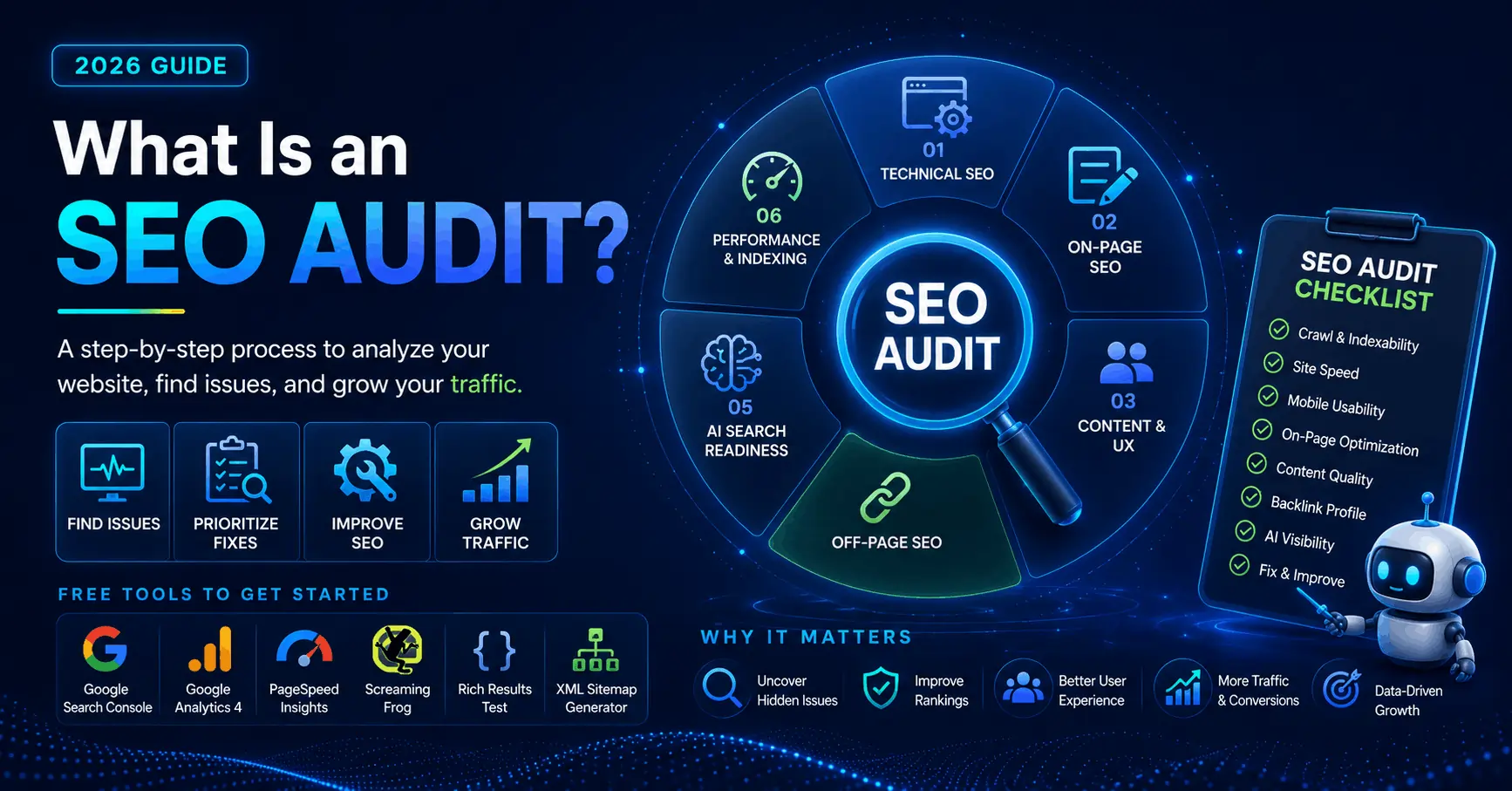
A complete audit covers four areas:
- Technical SEO. Can search engines crawl, render, and index your pages? This is speed, mobile usability, broken links, redirects, and your sitemap.
- On-page SEO. Is each page optimized for the terms people actually search? This is titles, headings, content, and keyword targeting.
- Content and user experience. Does your content answer the query better than competing pages, and do visitors stay?
- Off-page SEO. Who links to you, and do those links help or hurt? This is mostly your backlink profile.
In 2026, a fifth layer matters too: whether AI search tools can read and cite your content, since a growing share of searches now end with an AI-generated answer instead of a click.
The output of a good audit is not a 200-item report you file and forget. It’s a short, ranked list of problems and the order to fix them in. That distinction is the whole game.
What an SEO Audit Is Not
An audit is a diagnosis, not a cure. It tells you what’s wrong. It doesn’t fix anything on its own.
It’s also not a one-time event. Search engines update their ranking systems constantly, competitors keep publishing, and pages that ranked last year quietly slip.
And it’s not about chasing a perfect score in a tool. A page scoring 92 out of 100 that sits at position one is healthier than a flawless page nobody visits. Rankings and traffic are the real scorecard.
Why Bother Running One?
Most websites leak traffic in ways the owner never sees. Pages fall out of the index, slow load times push visitors away, and old posts stop ranking without warning.
An audit surfaces those leaks. It explains why a page that should rank doesn’t, why traffic dropped last quarter, or why a competitor with thinner content outranks you anyway.
It also protects your budget. If you’re about to pay for a content sprint or a link campaign, an audit tells you whether your foundation can support that spend. Buying links while Google can’t crawl half your site is like buying premium fuel for a car with a flat tire.
When Should You Run an SEO Audit?
You don’t need to audit every week. You do need one when something changes or something feels off. Common triggers:
- Organic traffic drops, or slides for more than a few weeks, with no obvious cause.
- You migrate to a new domain, redesign the site, or switch your CMS.
- A Google core update lands and your rankings move.
- You’re about to invest in content or ads and want a clean foundation first.
- You inherited a site and have no idea what shape it’s in.
If none of those apply, a light quarterly check plus a deeper audit once or twice a year keeps most sites healthy. Bigger or faster-moving sites need more frequent attention.
The Tools You Need (Start Free)
You can run a thorough first audit without paying for anything. The free stack does most of the work:
- Google Search Console. The single most important tool. It shows which pages Google has indexed, which it skipped, what queries you rank for, and where Core Web Vitals fail. If you set up nothing else, set up this.
- Google Analytics 4. Shows what visitors do once they land, and which pages earn organic traffic.
- PageSpeed Insights. Measures Core Web Vitals and flags what slows a page down.
- A crawler. Screaming Frog crawls up to 500 URLs free, enough for most small sites. It surfaces broken links, redirect chains, missing titles, and orphan pages in one pass.
- Google’s Rich Results Test. Confirms your structured data is valid.
Paid tools like Ahrefs and Semrush add depth, mainly for backlink data, keyword research, and rank tracking over time. They’re worth it once SEO becomes a regular job. You don’t need them to find what’s hurting you today.
How to Do an SEO Audit
Here’s where most guides go wrong. They list fifty checks in no particular order. But order decides everything. There’s no point optimizing a title tag on a page Google can’t even find, so work top down, from “can search engines see this at all” to the finer polish.
Step 1: Confirm Google Can Find and Index Your Pages
Start at the foundation. If a page isn’t indexed, it can’t rank. Full stop.
In Search Console, open the Pages report under Indexing. It splits your URLs into indexed and not indexed, with reasons for the exclusions. Look for important pages stuck in buckets like “Crawled, currently not indexed” or “Excluded by ‘noindex’ tag.”
Then run these quick checks:
- Search
site:yourdomain.comin Google. The rough result count shows how many pages Google has indexed. If it’s far lower than your real page count, you have an indexing problem to chase first. - Open your robots.txt file at
yourdomain.com/robots.txt. Make sure you aren’t accidentally blocking important sections. A single strayDisallow: /can hide your whole site. - Confirm your XML sitemap exists, lists your real URLs, and is submitted in Search Console.
- Search your templates for leftover
noindextags. Pages often carry one from their staging days, and it quietly keeps them out of Google.
Fix anything here before moving on. Nothing else in the audit matters while your pages are invisible.
Step 2: Check Your Technical Foundation
Once Google can reach your site, audit the plumbing. Search engines reward fast, stable, mobile-friendly pages.
Run your crawler and look for:
- Broken links and 404 errors, internal and outbound. They waste crawl budget and frustrate users.
- Redirect chains, where one URL redirects to another that redirects again. Collapse them to a single hop.
- Missing or duplicate title tags and meta descriptions. Every important page needs its own.
- Orphan pages, which have no internal links pointing to them, so users and crawlers struggle to find them.
- HTTPS and canonical tags. Confirm the site loads securely and that duplicate URLs point to one canonical version.
Then check Core Web Vitals, which Google uses as a ranking signal. There are three:
- Largest Contentful Paint (LCP) measures loading. Aim for under 2.5 seconds.
- Interaction to Next Paint (INP) measures responsiveness. It replaced First Input Delay in 2024. Aim for under 200 milliseconds.
- Cumulative Layout Shift (CLS) measures visual stability, the annoying jump when content loads and shifts the button you were about to tap. Aim for under 0.1.
Google grades these on real visitor data, and the mobile scores are the ones that count, since it indexes the mobile version of your site first. Pull the Core Web Vitals report in Search Console to see where you stand.
Step 3: Review Your On-Page SEO
On-page elements tell Google what each page is about. They’re usually the cheapest fixes with the most direct payoff.
For your most important pages, check that:
- The title tag is unique, leads with the primary keyword, and fits in roughly 50 to 60 characters.
- The meta description gives someone a reason to click. It isn’t a direct ranking factor, but it drives the click-through that is.
- There’s one H1 that matches the topic, with H2s and H3s organizing the rest.
- The content matches search intent, not just the keyword. Someone searching “how to do an SEO audit” wants steps, not a sales pitch. Search your target term and study what already ranks. If the top results answer a different question than your page does, you have a relevance problem no amount of polish will fix.
- Internal links connect related pages with descriptive anchor text, so authority flows through the site and every key page sits within a few clicks of the homepage.
Watch for keyword cannibalization here: two or more of your pages competing for the same query and splitting their strength. When that happens, Google struggles to pick one, and all of them suffer. Consolidate them into a single stronger page.
Step 4: Audit Your Content
Technical fixes get you into the race. Content wins it. This layer sinks more capable sites than broken tags ever will, so slow down.
Pull a list of every page, sort by organic traffic, and put each one into three piles:
- Keep. Pages that perform. Leave them alone, or refresh them when traffic starts to slip.
- Improve. Pages on the right topic that are thin, outdated, or poorly structured. Expand, update, and sharpen them.
- Cut. Thin, duplicate, or irrelevant pages that earn nothing and serve no purpose. Consolidate or remove them, because low-value pages drag down how Google sees the whole site.
While you review, watch for content decay: strong pages that slowly lost rankings because the information went stale or a competitor published something better. Refreshing an existing page often beats writing a new one, and it’s faster.
This is also where E-E-A-T comes in, short for Experience, Expertise, Authoritativeness, and Trustworthiness. Google’s quality systems favor content that shows real, first-hand experience and clear authorship. In practice that means named authors with genuine bios, sources for your claims, and actual expertise on the page instead of generic filler.
Step 5: Examine Your Backlink Profile
Backlinks, the links from other sites to yours, remain one of the strongest off-page signals. The audit question is about quality, not raw count.
Use Search Console’s Links report (free) or a paid tool to review:
- Who links to you, and whether those sites are relevant and reputable. Ten links from trusted sites in your field beat a thousand from random directories.
- Anchor text. The clickable text pointing to you should look natural and varied. A flood of identical, keyword-stuffed anchors can signal manipulation.
- Toxic or spammy links appearing in unusual volume. In most cases Google discounts them, so don’t panic. Reserve the disavow tool for genuinely manipulative links you can’t get removed.
Then look outward. Pull a competitor’s backlinks and find the sites that link to them but not to you. Those are your most realistic outreach targets.
Step 6: See How You Stack Up, Including in AI Search
Finally, look at the results page itself. Search the keywords you care about and study what’s winning.
Note who ranks above you and what their pages do that yours doesn’t: deeper coverage, clearer structure, better examples. Audit the top three to five results and ask two questions. What do they all include? You probably need it too. What does none of them include? That’s your opening to stand out.
Then look at the format of the page. A growing number of searches now show an AI Overview or feed an assistant like ChatGPT or Perplexity, often before any blue link. Two things help you stay visible there: structuring content with clear, direct answers to real questions, and confirming you don’t accidentally block AI crawlers (GPTBot, ClaudeBot, PerplexityBot, and Google-Extended) in your robots.txt. Featured snippets feed many of these answers, so the on-page work from Step 3 pulls double duty.
How to Prioritize What You Find
This is the step most DIY audits botch. You finish with a long list and fix it in the order you found it, which means easy, low-impact tweaks get done while the one issue actually suppressing your traffic sits untouched.
Score every finding on two axes: impact and effort. That gives you four buckets.
- High impact, low effort. Do these first, today. A noindex tag hiding key pages, a broken canonical, a sitemap full of dead URLs. Small change, big result.
- High impact, high effort. Schedule these next. A site speed overhaul, a content consolidation project, a structural rebuild.
- Low impact, low effort. Batch them for a slow afternoon.
- Low impact, high effort. Skip them, or revisit much later.
A useful rule of thumb: a handful of critical fixes usually captures most of the available gain. Find those few, do them properly, and measure before moving on. Auditing without prioritizing is just writing a longer to-do list.
Then turn each fix into a specific task with an owner and a deadline. “Improve site speed” is a wish. “Compress the hero images on the top 10 landing pages by Friday” is a task.
Common SEO Audit Mistakes to Avoid
A few traps catch nearly everyone running their first audit:
- Tool worship. Treating every flag as urgent. Many warnings are cosmetic. Use judgment.
- Auditing without acting. A polished report that sits in a drawer changes nothing. The fixes are the point.
- Ignoring search intent. Perfecting every technical detail on a page that answers the wrong question. You’ll still lose to a page that matches what searchers want.
- Fixing symptoms, not causes. Patching one broken link when a template generates hundreds. Look upstream.
- Doing it once. Treating the audit as a finish line instead of a recurring habit.
Your SEO Audit Checklist (Quick Recap)
For each item, answer the plain question:
- Indexing. Can Google find and index every page you care about?
- Sitemap and robots.txt. Submitted, accurate, and not blocking key pages?
- Core Web Vitals. Do important pages hit “Good” on LCP, INP, and CLS?
- Mobile. Does the site work cleanly on a phone?
- HTTPS. Does every page load securely?
- Broken links and redirects. Are 404s and redirect chains cleaned up?
- Titles and meta descriptions. Unique, accurate, and compelling on every page?
- Headings and content. Does each page clearly answer one search intent?
- Internal links. Do key pages get enough links, with no orphans?
- Backlinks. Is your profile healthy, with nothing toxic?
- AI visibility. Are AI crawlers allowed, and does your content answer questions directly?
- Priorities. Have you sorted every fix by impact and effort?
The Bottom Line
An SEO audit isn’t a mysterious agency ritual. It’s diagnosis and triage: find what’s costing you traffic, then fix the highest-impact problems first. Confirm Google can index your pages, work down through technical health, on-page quality, content, and links, and let impact versus effort set your order.
You don’t need expensive software to start. Open Google Search Console today and run Step 1: pull the Pages report and see how many of your pages Google actually indexes. That single number reveals more traffic-killing problems than any other check, and it costs you ten minutes.
Then work through the rest at your own pace, write down your top three issues, and fix those first. Your rankings are the sum of dozens of small decisions. An audit is how you start making them on purpose.
Frequently Asked Questions About SEO Audits
Can ChatGPT do an SEO audit?
Yes. ChatGPT can help with an SEO audit by reviewing page content, analyzing HTML, checking headings, identifying thin or duplicate content, suggesting title tags and meta descriptions, and turning findings into clear action items.
For even better results, you can use a custom ChatGPT agent to automate parts of the audit process. For example, it can fetch HTML, review page structure, check keyword intent, flag on-page SEO issues, and generate prioritized recommendations.
However, ChatGPT works best when paired with real SEO data from tools like Google Search Console, Screaming Frog, Ahrefs, Semrush, Google Analytics, and PageSpeed Insights. It can speed up the audit process, but it should not replace crawl data, traffic data, backlink data, or expert judgment.
How much do SEO audits cost?
SEO audits typically cost between $500 and $7,500, depending on the size of your website, the complexity of the issues, and the depth of the analysis.
A small local business site may only need a basic audit covering indexing, metadata, page speed, and content quality. A larger ecommerce, SaaS, or enterprise website may require a deeper review of technical SEO, site architecture, content performance, backlinks, analytics, and conversion issues.
You can also run a basic SEO audit yourself using free tools like Google Search Console, Google Analytics, PageSpeed Insights, and Screaming Frog’s free version. Paid audits are most useful when you need expert diagnosis, prioritization, and a clear implementation roadmap.
Which tool is best for an SEO audit?
The best SEO audit tool depends on what you need to analyze.
For technical SEO audits, Screaming Frog is one of the strongest options because it crawls your website and helps uncover issues like broken links, redirect chains, duplicate titles, missing metadata, canonical problems, and crawl errors.
For all-in-one SEO audits, Semrush and Ahrefs are popular choices because they combine site audits with keyword research, backlink analysis, competitor research, and rank tracking.
For beginners, the best starting stack is usually Google Search Console, PageSpeed Insights, Google Analytics, and Screaming Frog’s free version. This gives you enough data to find indexing problems, speed issues, broken links, and underperforming pages without a large budget.
Last Updated on 2 months ago by Alipio Umiten IV
