




You publish a new page. Days later, it still seems invisible in Google.
The instinct is to blame rankings, content, keywords, or indexing. Yet the problem can happen earlier: Google may not know the URL exists.
That stage is SEO discovery.
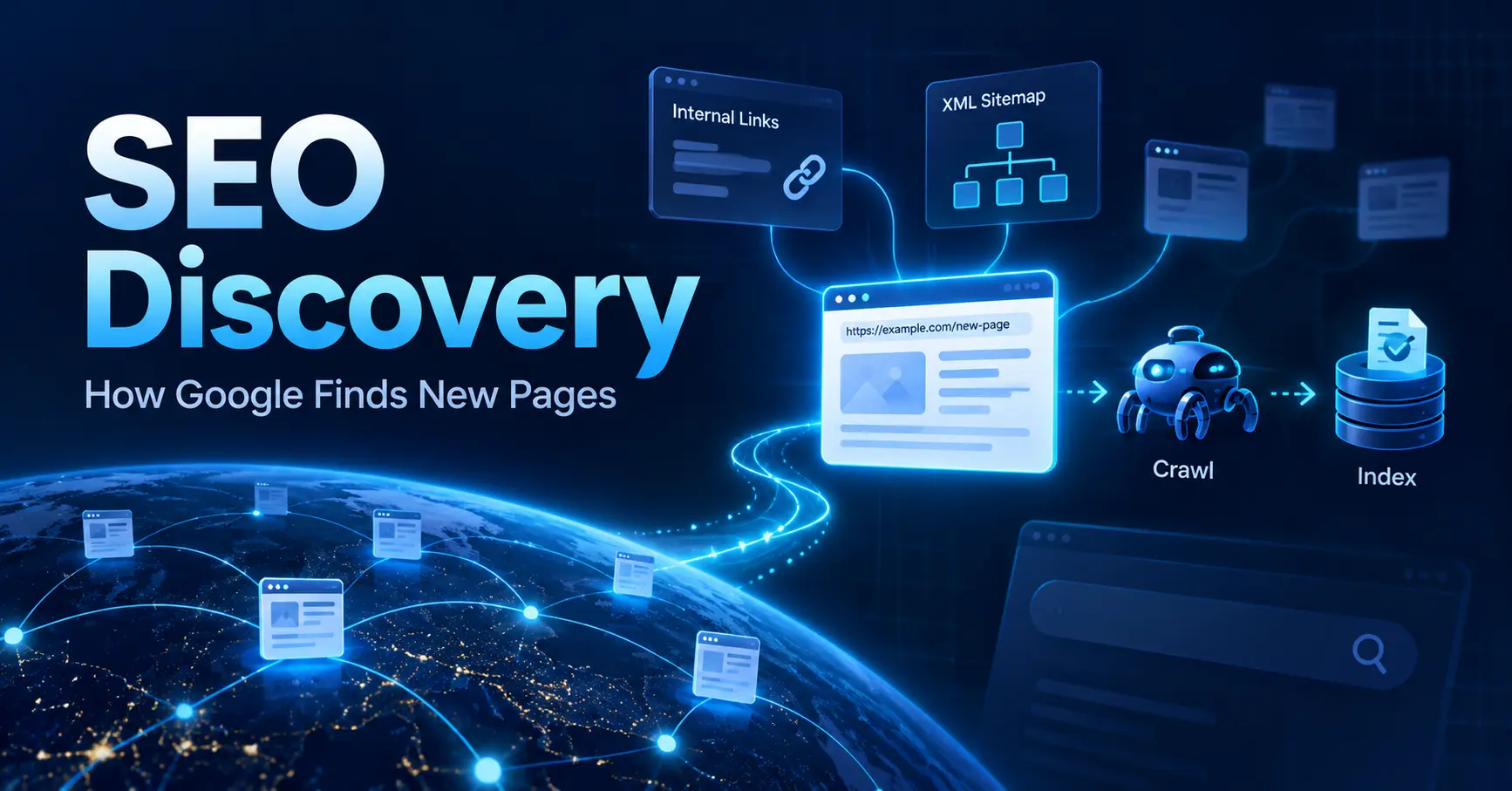
Discovery means Google learns that your page exists. Crawling means Googlebot requests the URL. Indexing means Google processes the fetched page for its search index. Ranking comes later.
Keeping those stages separate makes a missing-page problem much easier to diagnose.
What Is SEO Discovery?
SEO discovery is the process by which Google becomes aware that a URL exists.
A page can be live, return a 200 OK response, contain useful material, and work perfectly in a browser while remaining unknown to Google. Publishing a URL does not automatically place it on a master list of websites.
Google has to encounter the address somewhere.
That can happen through a crawlable link, an XML sitemap, a redirect, a link from another website, or another source available to Google’s systems.
Once the URL is discovered, Google has an address it can consider for crawling.
Discovery does not prove that Googlebot has visited the page. It does not prove that the page has entered Google’s index. It does not guarantee that the page will appear for a search.
It proves one thing: Google knows the URL exists.
SEO Discovery vs. Crawling vs. Indexing
These terms describe different events, and mixing them together leads to bad diagnosis.
| Stage | What happens | A missing page may indicate |
|---|---|---|
| Discovery | Google learns that the URL exists | Google has no clear route to the URL |
| Crawling | Googlebot requests the URL | Access, server, robots, or scheduling issues |
| Indexing | Google processes the fetched page | Canonical, duplication, directives, or page-related issues |
| Ranking | Google decides where an indexed page may appear | Relevance and ranking factors become the focus |
Consider a new page at:
example.com/services/seo-audit/
If Google does not know that URL exists, changing its title tag will not repair the discovery problem.
If Google knows the URL but has not fetched it, discovery has already worked. Attention moves to crawling.
If Googlebot has fetched the page but Google has not indexed it, the investigation moves again.
This creates a much cleaner diagnostic sequence:
Does Google know the URL? → Has Google crawled it? → Has Google indexed it? → How does it perform in search?
Start with the earliest unanswered question.
How Does Google Discover New Pages?
Google finds URLs by moving from addresses it already knows to addresses it encounters.
For most websites, several discovery routes deserve attention.
Crawlable Internal Links
Internal links give Googlebot routes through your site.
Suppose a publisher creates a new article but never links to it from the blog archive, category page, topic hub, related-post section, or another article.
Anyone with the exact URL can open it. A crawler moving through the site’s normal link structure may never encounter it.
A standard HTML link gives Google a direct address to extract:
<a href="/seo-discovery/">SEO discovery</a>
A clickable element that depends only on an event handler is less dependable as a discovery route:
<span onclick="openPage('/seo-discovery/')">SEO discovery</span>
For a page meant to appear in search, place it inside the site’s crawlable link structure rather than treating the exact URL as the only way to reach it.
Useful linking locations include category pages, service hubs, topic pages, product categories, archives, navigation areas, and related articles.
XML Sitemaps
An XML sitemap gives Google a list of URLs from your site.
For a new page, the sitemap supplies another route through which Google can learn the address. This is especially relevant for newly launched sites, large sites, migrations, and pages that sit deep within the site’s link structure.
A sitemap is not an indexing command.
Being listed in sitemap.xml does not mean Google has crawled the URL, and it does not mean Google will add the page to its index.
Treat sitemap inclusion as a discovery signal.
For each search-facing page, the sitemap should contain the intended canonical URL rather than a redirecting, broken, or alternate version.
Internal links and sitemap entries should also agree on the URL format. A site that links to one variation while listing another in its sitemap creates unnecessary ambiguity.
Links From Other Websites
A crawlable link from another website can expose a new URL to Google.
When Google processes a page it already knows and encounters a link to your page, the destination becomes another address its systems can consider.
External links are not required for every page.
A site should have its own reliable discovery paths through internal linking and, where appropriate, XML sitemaps rather than depending on another domain to reveal its pages.
Redirects and Previously Known URLs
Redirects provide another path.
During a migration or URL change, Google may request an old address it already knows and encounter a redirect to the replacement URL.
For example:
/old-seo-guide/ → /guides/seo/
That redirect exposes the destination.
After a migration, direct internal links to the new URLs are still preferable to leaving every internal route pointed at the old versions. Updating the sitemap with the intended destination URLs also gives Google a clearer list of current pages.
What Is an Orphan Page?
An orphan page has no crawlable internal link pointing to it from the site’s normal page structure.
The page might still exist in the CMS. It might receive visits from an email campaign or paid ad. It might even appear in the XML sitemap.
None of those facts mean a crawler moving through internal links will reach it.
An orphan page is not automatically undiscovered. Google might learn about it from a sitemap, external link, redirect, previous crawl, or submission.
The problem is that the site has removed one of its most direct and repeatable discovery routes.
A useful audit compares the URLs your organization knows about with the URLs a crawler can reach.
Compare CMS records, sitemap URLs, analytics landing pages, and other URL inventories against a crawl that begins from a normal site entry point.
Pages present in the inventory but absent from the crawl deserve inspection.
Some may be intentionally isolated. Others are publishing errors.
How JavaScript Can Affect URL Discovery
JavaScript itself does not make a page undiscoverable.
The issue is the link markup produced by the interface.
A visitor may click a menu, card, tab, or button and reach another page without noticing whether the rendered page contains a standard link. Googlebot still needs an extractable route to the destination.
For JavaScript-heavy websites, inspect the rendered HTML.
A destination meant for crawling should appear as a real anchor with a usable href rather than existing only behind a script interaction.
This matters for product grids, infinite interfaces, navigation menus, related-content widgets, filters, and application-style websites.
A site can feel perfectly navigable to a human while exposing far fewer URLs to a crawler.
Does robots.txt Stop Discovery?
Not necessarily.
robots.txt controls crawling access. It does not automatically prevent Google from learning that a URL exists.
Google may encounter a blocked URL through another page’s link, a sitemap, or another reference. In that situation, the address can become known even though Googlebot is not permitted to fetch the page.
That distinction matters when diagnosing search behavior.
Discovery asks: Does Google know the URL?
Crawl permission asks: Is Googlebot allowed to fetch it?
Those are separate questions.
A robots rule should not be treated as a method for making a URL secret or unknown.
Does Discovery Guarantee Crawling or Indexing?
No.
A discovered URL has crossed the awareness stage. Google still decides whether and when to crawl it.
A crawled page also does not automatically enter the index.
That gives a page several possible states:
Unknown URL: Work on discovery paths.
Known but not crawled: Inspect crawl access, server behavior, site structure, URL signals, and Google’s crawl scheduling.
Crawled but not indexed: Move away from discovery and review indexing-related evidence such as canonical handling, duplication, directives, and the page itself.
Indexed: Discovery, crawling, and indexing have already happened. Ranking analysis now belongs later in the investigation.
This separation prevents hours of work on the wrong part of the process.
How to Check Whether Google Has Discovered a URL
Google Search Console provides the clearest site-owner evidence for an individual URL.
Inspect the Exact Canonical URL
Open URL Inspection and enter the exact URL that should represent the page.
Review the information Google provides about the address, including crawl activity, indexing state, canonical data, and other available details.
The wording varies depending on the page’s state, so avoid diagnosing the problem from one headline message alone.
A missing crawl date can point toward a page Google has not yet fetched. Pair that information with the site’s discovery routes.
For a small number of new or changed URLs, Search Console also provides a request-indexing action.
Treat it as a notification to Google, not a command. Repeated requests do not turn indexing into an immediate process.
Check the XML Sitemap
Open the live sitemap rather than assuming your CMS added the page correctly.
Confirm that the intended canonical URL appears there.
Also check that the sitemap itself is accessible and that the listed URL does not redirect somewhere unexpected.
An accepted sitemap submission means Google received access to the submitted URL list. It does not prove every URL was crawled or indexed.
Crawl the Site From a Normal Entry Point
Run a crawler from the homepage or another standard starting page.
Search for the new URL in the crawl results.
If the URL appears in your CMS or sitemap but not in the crawl, inspect the internal linking structure around it.
This test can expose articles that were published but left out of archives, products omitted from category pages, broken pagination, missing navigation links, or pages reachable only through internal search.
Check Server Logs When the Site Is Large Enough
Server logs provide direct evidence that Googlebot requested a URL.
A Googlebot request proves crawl activity.
The absence of a request during the period covered by your logs does not prove that Google has never discovered the address, but it tells you the URL was not fetched during that period.
For large sites, log data becomes especially useful when entire sections contain thousands or millions of URLs.
A Practical SEO Discovery Audit
When a new page seems invisible in Google, check these items in order:
- Confirm the final URL. Open the page and record the intended canonical address. Watch for unexpected redirects, hostname variations, HTTP/HTTPS mismatches, parameters, and trailing-slash differences.
- Check the HTTP response. Confirm that the intended URL returns the expected page rather than an error, redirect loop, login screen, or unrelated response.
- Find a crawlable internal link. Verify that at least one normal page links to the URL using a real
<a href="">link. - Check crawl depth. See where the URL sits within the site. A page hidden behind broken archives, pagination, filters, or script-only navigation has a weaker discovery route.
- Inspect the XML sitemap. Confirm that the canonical URL appears in the correct sitemap and that the sitemap is accessible.
- Compare URL versions. Internal links, sitemap entries, redirects, and canonical tags should point toward the same intended address.
- Review JavaScript-rendered links. Confirm that interactive navigation creates crawlable anchors rather than only click behavior.
- Check robots rules separately. Remember that blocking a crawl does not necessarily prevent URL discovery.
- Inspect the URL in Search Console. Determine whether Google’s evidence points to discovery, crawling, indexing, or canonical handling.
- Review server logs when useful. Look for Googlebot requests to separate a known-but-uncrawled URL from one that has already been fetched.
- Identify orphan pages. Compare your complete URL inventory with URLs reachable through an internal crawl.
- Diagnose the earliest failed stage. Once discovery is confirmed, stop treating the problem as a discovery issue and move forward to crawling or indexing.
This order keeps the investigation tied to observable evidence.
A Simple SEO Discovery Example
A publisher creates:
https://example.com/guides/technical-seo-audit/
The page returns 200 OK. It has a self-referencing canonical. It contains no accidental noindex directive and loads normally when opened directly.
Yet the article is absent from the site’s article hub. No related page links to it. The sitemap generator also failed to include it.
The page itself looks healthy.
Its discovery paths are weak.
The publisher adds a crawlable link from the article hub and places the canonical URL in the sitemap.
Google now has clear routes through which it can learn the address.
That still does not promise an immediate crawl or index entry. It fixes the discovery problem and moves the URL to the next diagnostic stage.
The example shows why testing a page in a browser tells very little about whether Google can find it.
Common SEO Discovery Mistakes
Several recurring errors make discovery harder to diagnose.
Publishing a page with no internal links. The page exists, but the site’s normal crawl paths do not lead to it.
Treating sitemap submission as indexing. A sitemap exposes URLs. Google still controls crawling and indexing.
Relying on script-only navigation. A usable interface for visitors does not automatically create crawlable links.
Mixing several URL versions. Internal links, sitemaps, redirects, and canonicals that disagree can complicate Google’s view of the destination.
Treating robots.txt as URL secrecy. A blocked page can still become known through other references.
Repeatedly requesting indexing. Multiple requests do not create a guaranteed fast lane.
Editing content before checking discovery. Rewriting headings or copy cannot repair an absent crawl path if Google has never encountered the URL.
How Fast Does SEO Discovery Happen?
There is no fixed timetable for every page.
A URL linked from a section Google visits frequently may be encountered sooner than a page buried deep within weak navigation.
A new site with few known links may depend more heavily on its sitemap and the crawl paths it creates.
Site size, crawl patterns, server behavior, link structure, and Google’s scheduling all affect what happens after publication.
Avoid universal promises such as “Google will discover every page within 24 hours.”
For a claim about average discovery time, use measured data from the specific site or a sourced dataset rather than inventing a number.
Google does not publish a universal average for URL discovery time. Its Search Console documentation says that once Google knows a URL, crawling can still take up to a few weeks, depending on the site and Google’s crawl scheduling. That figure describes the delay after discovery rather than the time required for discovery itself, so discovery speed should be measured from site-specific data rather than presented as a universal benchmark.
SEO Discovery on Large Sites
Discovery becomes harder to manage as the number of URLs rises.
An ecommerce site may contain products, product variants, filtered categories, pagination, seasonal pages, and discontinued items. A publisher may have thousands of articles, author pages, categories, and tag archives. A marketplace may generate location, listing, and profile pages at scale.
The job is to give Google clear paths to URLs that deserve crawling without creating endless low-use combinations.
Large sites benefit from accurate segmented sitemaps, working pagination, consistent canonical URLs, clean redirects, controlled faceted navigation, internal crawl reports, and server-log analysis.
Segmented sitemaps can also make patterns easier to spot.
If one product sitemap contains 40,000 URLs but Google rarely crawls that group, the issue is easier to investigate than when every content type sits inside one huge URL list.
Google’s crawl-budget guidance treats sites with 1 million or more unique pages that change about weekly, or 10,000 or more unique pages that change daily, as sites where advanced crawl management may become relevant. Google describes those numbers as rough estimates rather than exact thresholds. At that scale, maintaining clear URL inventories, current sitemaps, efficient internal linking, and controlled duplicate or low-value URL generation becomes increasingly important.
Make SEO Discovery Part of Publishing QA
Discovery problems are easier to prevent than to diagnose weeks later.
A new page should not be treated as fully published merely because the CMS says “Published” and the browser returns a working page.
Before the publishing task is closed, verify that the canonical URL has entered the site’s crawlable structure and, where applicable, its sitemap.
A compact publishing check can cover the canonical URL, at least one crawlable internal link, sitemap inclusion, rendered link markup, redirects where relevant, and a later Search Console review.
That changes SEO discovery from an accidental outcome into a repeatable publishing requirement.
Fix the Earliest Failed Stage
SEO discovery is the moment Google learns that a URL exists.
Links, XML sitemaps, redirects, and other known references can expose that address. Discovery comes before Googlebot fetches the page, and crawling comes before indexing.
So when a newly published page is missing from Google, resist the urge to start with rankings or rewrite the copy.
Ask one question:
Does Google know this URL exists?
If the answer is no, repair the discovery path.
If the answer is yes, move to the next stage and diagnose the evidence there.
Pick one recently published URL and trace every route Google has to it. Check its internal links, sitemap entry, rendered navigation, Search Console information, and server activity where available.
That will tell you far more about the problem than searching Google for the page again.
Last Updated on 2 weeks ago by Alipio Umiten IV
